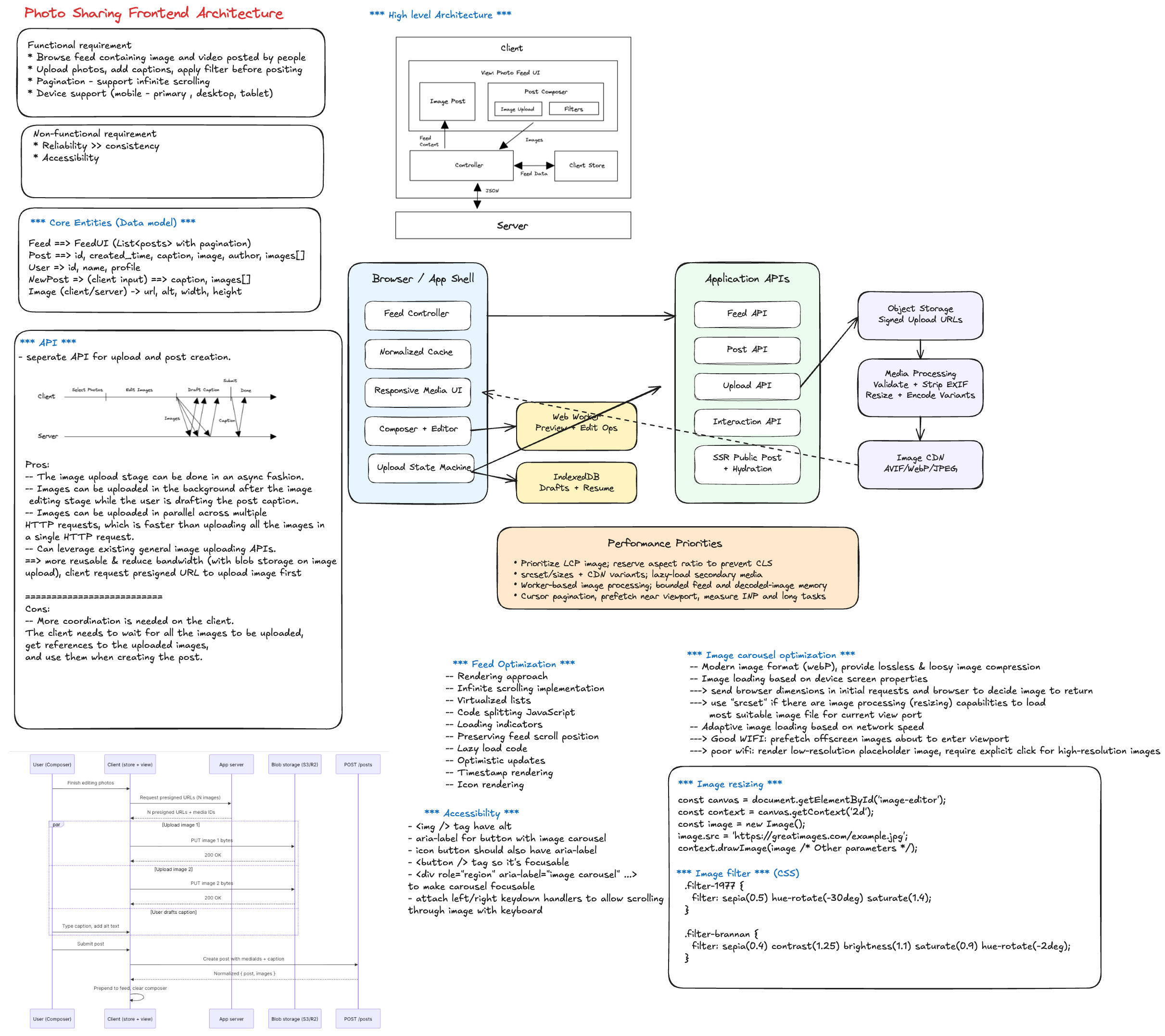
Frontend System Design Interview: Photo Sharing App
Use this as a discussion framework for an Instagram-like frontend system design interview.
At staff level, show product thinking, architectural tradeoffs, scale and reliability strategy, and measurable outcomes.
1. Clarify Scope and Constraints (First 3-5 minutes)
- Surfaces in scope:
- Home feed
- Post creation/upload
- Post detail
- Profile
- Notifications
- Content types: photos only, or photos + reels/stories/video.
- Interaction features: likes, comments, saves, follows, shares.
- Platform: web only vs mobile web parity.
- Constraints: low-end devices, poor networks, SEO needs, accessibility.
Good opening line
"I will optimize for fast feed consumption, reliable media upload and rendering, and responsive engagement interactions while maintaining correctness and trust."
2. Define Success Metrics
- Product:
- Feed session length
- Engagement rate (likes/comments/saves)
- Post creation completion rate
- Return frequency
- Technical:
- LCP/INP/CLS on feed and profile
- Upload success rate and median upload time
- Interaction latency for like/comment actions
- Error rate by surface
3. Core User Flows to Decompose
- Open app and consume personalized feed.
- Open post detail and engage (like/comment/save/share).
- Create post: pick media, edit, caption, publish.
- View profile and scroll history.
- Receive and handle notifications.
Design around these paths, not isolated widgets.
4. Frontend Architecture You Should Explain
- App shell and route-level code splitting.
- Domain modules:
- Feed module
- Composer/upload module
- Engagement module (likes/comments/saves)
- Profile module
- Notification module
- Auth/session module
- Data layer:
- API client with retries/backoff
- Request dedupe
- Entity cache (posts/users/comments)
- Realtime update adapter (optional)
5. Data Model Pointers
- Post: id, authorId, media variants, caption, createdAt, counts, viewer state.
- User: id, handle, avatar, follow relationship.
- Comment: id, postId, authorId, text, createdAt.
- Feed page: cursor + ordered post ids.
- Upload draft: local file refs, progress, retries, error reason.
6. Feed Rendering Strategy
- Cursor-based pagination for infinite scrolling.
- IntersectionObserver for loading next page.
- Skeleton placeholders and aspect-ratio boxes to avoid layout shift.
- Preserve scroll position and avoid jumps during background refresh.
- Optional virtualization for very long sessions.
7. Media Delivery and Performance
- Responsive images (
srcset,sizes) and modern formats. - CDN transformations (size/quality/format).
- Lazy-load below-the-fold media.
- Prioritize above-the-fold media and first interaction readiness.
- Progressive loading (placeholder -> preview -> full quality).
8. Upload/Composer Flow (High-Impact Staff Topic)
- Client-side validation:
- file type
- file size
- resolution limits
- Upload architecture:
- direct upload with signed URL
- chunked upload for large media
- resumable retry strategy
- UX states:
- pending
- uploading
- processing
- posted
- failed with retry
9. Engagement Interactions (Like/Save/Comment)
- Optimistic UI for low-latency feel.
- Reconcile with server responses and rollback on failure.
- Prevent duplicate taps and race conditions.
- Batch interaction updates where possible.
10. Realtime and Freshness Strategy
- Feed can be near-realtime for most products.
- Notifications or active post detail may use realtime updates.
- Handle eventual consistency:
- count drift
- deleted/hidden content
- moderation state changes
11. Important Tradeoffs to Highlight
- Strong freshness vs battery/network cost.
- Aggressive prefetching vs memory/data usage.
- Rich media UX vs low-end device performance.
- Optimistic updates vs temporary UI inconsistency.
- Client cache depth vs stale-content risk.
12. Reliability and Failure Handling
- Partial rendering when non-critical APIs fail.
- Retry strategies with capped exponential backoff.
- Clear error boundaries at feature-module level.
- Upload resume and retry support.
- Safe fallback when media CDN is degraded.
13. Accessibility and UX Quality
- Keyboard navigation and focus order.
- Alt text support and accessible controls.
- Screen-reader labels for interactive actions.
- Contrast/readability for overlays and metadata.
- Reduced motion handling for transitions.
14. Security, Privacy, and Safety
- Sanitize user-generated text.
- Secure media URL handling and access checks.
- Respect privacy settings for private accounts.
- Abuse controls: spam throttling, reporting, moderation states.
15. Observability and Experimentation
- Product events:
- feed_impression
- post_open
- like_click
- comment_submit
- upload_start/upload_success/upload_fail
- Technical telemetry:
- feed API latency
- image decode/render times
- upload retry counts
- Feature flags for gradual rollout.
16. 45-60 Minute Interview Delivery Plan
- 0-5 min: scope and success metrics.
- 5-15 min: architecture and data model.
- 15-30 min: feed and media rendering path.
- 30-40 min: upload/composer and engagement actions.
- 40-50 min: tradeoffs, reliability, and accessibility.
- 50-60 min: scaling, rollout strategy, and edge cases.
17. Staff Signals Interviewers Want to Hear
- You separate critical path from nice-to-have features.
- You define correctness boundaries for optimistic UI.
- You design for progressive rollout and operational visibility.
- You discuss cross-team contracts (frontend, feed ranking, media pipeline, trust/safety).
- You tie technical choices to product outcomes.
18. Common Follow-up Questions
- How do you prevent feed jank on low-end devices?
- How do you handle duplicate likes/comments from retries?
- How do you design upload resume after app refresh?
- What should be eventually consistent vs strongly consistent?
- How would you evolve this for reels/stories/live content?