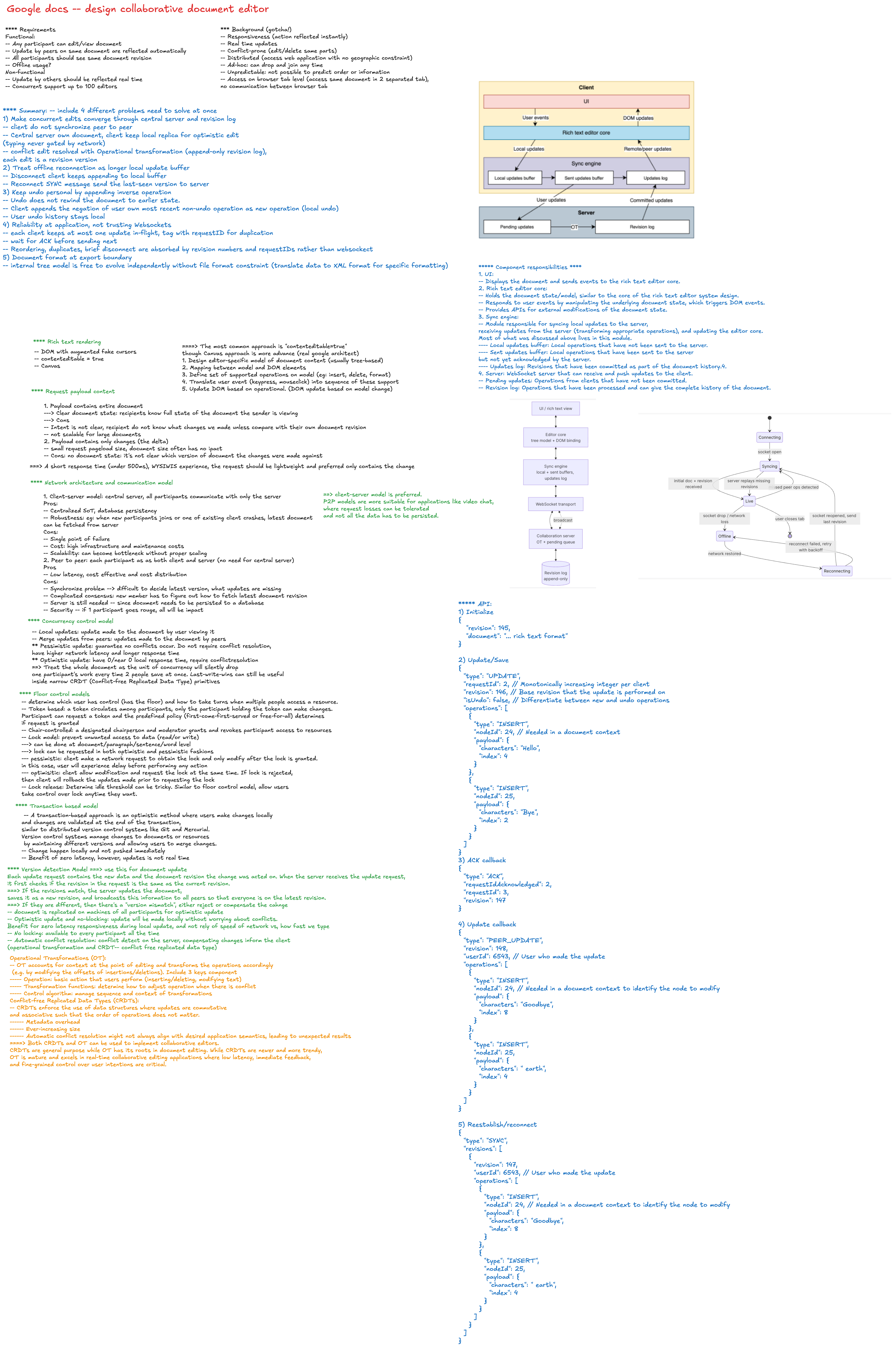
Google Docs System Design
Interview Goal
Design a collaborative document editor where multiple users can create, edit, format, comment on, and share documents in real time.
At staff level, explain more than the UI components. Define the consistency model, collaboration algorithm, failure recovery, ownership boundaries, and trade-offs that allow the product to evolve safely.
Staff-Level Interview Checklist
Use this checklist to structure the discussion:
- Clarify functional and non-functional requirements.
- Define the document data model and operation format.
- Explain real-time collaboration with OT or CRDT.
- Separate local editor state from synchronized document state.
- Handle cursor presence, comments, suggestions, and permissions.
- Support offline editing and reconnection.
- Define snapshots, operation logs, autosave, and version history.
- Discuss WebSocket lifecycle, ordering, deduplication, and retries.
- Keep large documents responsive through incremental rendering.
- Plan security, observability, testing, and gradual rollout.
- Identify trade-offs and organizational ownership.
1. Clarify the Requirements
Functional requirements
- Create, open, rename, move, and delete documents.
- Edit rich text with headings, lists, links, tables, and images.
- Autosave edits without requiring a manual save action.
- Allow multiple users to edit the same document concurrently.
- Display collaborators' cursors, selections, and presence.
- Support comments, replies, mentions, and resolved threads.
- Support suggestion mode and accept or reject changes.
- Provide document sharing with viewer, commenter, and editor roles.
- Maintain version history and restore an earlier version.
- Support offline editing and synchronization after reconnecting.
- Search documents and document content.
- Export or print common document formats.
Non-functional requirements
- Local typing should feel immediate, ideally within one animation frame.
- Remote edits should appear quickly without moving the local cursor incorrectly.
- No acknowledged edit should be silently lost.
- Documents should converge to the same state for all collaborators.
- The editor should remain responsive for large documents.
- Collaboration should recover from dropped or duplicated messages.
- Access changes should take effect quickly.
- The service should support regional and partial-service failures.
- The editor must be keyboard and screen-reader accessible.
Questions to ask the interviewer
- Are rich text, tables, images, and embeds all in scope?
- How many concurrent editors can one document have?
- What is the maximum expected document size?
- Is offline editing required?
- Do we need comments, suggestions, and version history?
- What consistency guarantees are required?
- Which platforms and browsers must be supported?
- Can users from different regions edit the same document?
- Are import and export fidelity important?
- What latency and availability targets matter most?
2. Define the Critical User Flows
Open a document
- Authenticate the user and authorize document access.
- Fetch the latest document snapshot and version.
- Connect to the collaboration session.
- Receive operations created after the snapshot version.
- Render the document and begin sending local operations.
Apply a local edit
- Capture the editor transaction.
- Apply it immediately to the local document.
- Add the operation to a pending-operation queue.
- Send the operation with document, client, and base-version identifiers.
- Reconcile it with concurrent remote operations.
- Remove it from the pending queue after acknowledgement.
Reconnect after going offline
- Preserve pending edits in durable local storage.
- Fetch operations or a snapshot newer than the client's known version.
- Rebase or merge pending local operations.
- Upload operations with stable, idempotent IDs.
- Confirm convergence before clearing local recovery data.
3. High-Level Architecture
Web / Mobile Editor
  |
  +-- Document API: metadata, snapshots, sharing, comments
  +-- Collaboration channel: operations, presence, acknowledgements
  +-- Local persistence: pending edits and offline snapshots
  |
API Gateway / Backend for Frontend
  |
  +-- Authentication and authorization
  +-- Document service
  +-- Collaboration service
  +-- Comment and suggestion service
  +-- Presence service
  +-- Search and indexing pipeline
  |
Storage
  |
  +-- Document metadata database
  +-- Snapshot store
  +-- Append-only operation log
  +-- Comment and permission stores
  +-- Search index
  +-- Blob storage for images and attachments
Use HTTP for snapshots, metadata, sharing, and history. Use WebSockets for ordered collaboration messages and presence. Presence is ephemeral and should not share the same durability requirements as document edits.
4. Document Data Model
Avoid treating a rich-text document as one large HTML string. Use a structured tree or block model with stable identifiers.
Document
  id
  version
  blocks[]

Block
  id
  type: paragraph | heading | list | table | image
  attributes
  children[]

Text node
  id
  text
  marks: bold | italic | link | comment | suggestion
Stable node IDs help target operations, comments, selections, and concurrent changes without relying only on fragile numeric offsets.
Example operations
{
  "operationId": "client-17:1042",
  "documentId": "doc-123",
  "clientId": "client-17",
  "baseVersion": 817,
  "type": "insert_text",
  "targetNodeId": "paragraph-42",
  "offset": 8,
  "text": "collaborative "
}
Operations need stable IDs for deduplication and enough context for validation, transformation, or merging.
5. Real-Time Collaboration
Operational Transformation
OT transforms concurrent operations against one another so they can be applied in a consistent order.
Advantages:
- Mature approach for centralized collaborative editors.
- Compact operation stream.
- Server can establish a canonical document version.
Challenges:
- Transformation rules become complex for rich document structures.
- Every operation pair must have deterministic transformation behavior.
- Offline and peer-to-peer scenarios require additional machinery.
Conflict-Free Replicated Data Types
CRDTs assign stable identities and ordering metadata so replicas can merge operations without a single transformation authority.
Advantages:
- Strong convergence properties.
- Natural support for offline and distributed editing.
- Local operations can be applied immediately.
Challenges:
- Metadata and storage overhead.
- Tombstone or compaction management.
- Rich-text semantics and schema validation remain difficult.
Choosing an approach
Choose based on product constraints rather than interview fashion:
- A centralized web editor with moderate offline support may favor OT.
- Offline-first, multi-device, or decentralized collaboration may favor CRDT.
- A proven collaboration framework is usually safer than implementing either algorithm from scratch.
Regardless of approach, define:
- How operations are ordered.
- How duplicates are detected.
- How clients recover missing operations.
- How schemas and permissions are validated.
- When snapshots compact the operation history.
- How cursor positions survive concurrent edits.
6. Frontend State Ownership
Separate state by update frequency and durability:
| State | Owner |
|---|---|
| Current document tree | Editor or collaboration model |
| Selection and composition | Editor instance |
| Pending operations | Collaboration client |
| Presence and remote cursors | Ephemeral presence store |
| Document title and permissions | Application query cache |
| Comments and suggestions | Document service or collaboration model |
| Toolbar and modal state | React UI state |
| Offline recovery data | IndexedDB |
Do not mirror the full document into ordinary React state on every keystroke. Keep high-frequency edits inside the editor model and expose focused, subscription-based updates to React controls.
7. Networking and Protocol
Each collaboration message should include:
- Document and session identifiers.
- Client and user identifiers.
- Stable operation or message ID.
- Base document version or logical clock.
- Operation payload.
- Sequence or acknowledgement information.
- Schema and protocol version.
The client should:
- Apply local edits optimistically.
- Queue unsent and unacknowledged operations.
- Retry idempotently after reconnecting.
- Detect sequence gaps and request missing operations.
- Request a new snapshot when its history is too stale.
- Send heartbeats and expose connection status.
- Use backpressure when incoming operations exceed rendering capacity.
8. Autosave, Snapshots, and Version History
Autosave is not one mechanism:
- The operation log provides durable fine-grained edits.
- Periodic snapshots reduce document reconstruction time.
- Named or automatic versions provide user-facing history.
- Local IndexedDB protects pending edits during browser crashes or offline use.
Create snapshots by operation count, elapsed time, or accumulated log size. Snapshot creation should not block active collaboration sessions.
Version restore should usually create a new head version rather than deleting newer history.
9. Offline Editing
- Persist the last usable snapshot and pending operations locally.
- Clearly show offline, reconnecting, and synchronized states.
- Continue local editing when supported by the collaboration model.
- Preserve operations across tab crashes and browser restarts.
- Reconcile remote and local changes deterministically after reconnecting.
- Keep retry queues bounded and observable.
- Ask the user for help only when a conflict cannot be represented safely.
Avoid claiming that a service worker alone solves offline collaboration. It can cache the application shell and requests, but the document model still needs a correct merge strategy.
10. Presence, Cursors, and Selections
Presence data is high-frequency and disposable:
- Throttle cursor and selection updates.
- Coalesce newer updates and drop stale ones.
- Expire disconnected users through leases or heartbeats.
- Assign stable collaborator colors with sufficient contrast.
- Transform cursor anchors as document operations arrive.
- Avoid persisting every cursor movement in the durable operation log.
The document must remain correct even if presence messages are lost.
11. Comments and Suggestion Mode
Comments should anchor to stable document positions or node ranges rather than raw screen coordinates.
Consider:
- What happens when the referenced text is edited or deleted?
- How comment anchors transform with concurrent operations.
- Thread state, replies, mentions, and resolution.
- Notification fan-out and permission checks.
- Whether comments appear in document version history.
Suggestions should be modeled as reviewable operations or document annotations, not merely colored text. Accept and reject actions must also collaborate correctly with concurrent edits.
12. Large-Document Performance
- Render only visible pages or blocks when possible.
- Incrementally parse, layout, and decorate changed regions.
- Avoid rebuilding the full document after every operation.
- Batch remote operations before rendering.
- Use workers for expensive parsing, indexing, or pagination calculations.
- Keep toolbar subscriptions narrow.
- Lazy-load images, comments, history, and nonessential editor plugins.
- Compact old collaboration metadata when the algorithm permits.
- Measure input latency, long tasks, memory, and layout shifts.
Virtualizing a rich-text editor is harder than virtualizing a list because selection, browser find, accessibility, printing, and cross-page ranges must still work.
13. Permissions and Security
- Enforce permissions on the server for every durable mutation.
- Support owner, editor, commenter, and viewer capabilities.
- Revalidate active sessions after access is revoked.
- Use short-lived session credentials and encrypted transport.
- Validate operation schemas, payload sizes, and referenced node IDs.
- Sanitize pasted or imported rich content.
- Scan uploaded files and serve them from controlled origins.
- Protect against cross-site scripting in links, embeds, and exported HTML.
- Maintain an audit trail for sharing and administrative actions.
- Avoid exposing document content in logs or analytics.
The client may hide unavailable controls, but it is never the authorization boundary.
14. Reliability and Recovery
| Failure | Expected behavior |
|---|---|
| WebSocket disconnects | Continue locally when possible and reconnect with backoff |
| Duplicate operation arrives | Ignore it using its stable operation ID |
| Sequence gap is detected | Fetch missing operations before applying newer ones |
| Client is too stale | Download a fresh snapshot and rebase pending edits |
| Collaboration region fails | Reconnect to a healthy region without duplicating edits |
| Snapshot write fails | Continue logging operations and retry snapshot creation |
| Presence service fails | Editing continues without remote cursor updates |
| Search indexing lags | Document remains editable; search becomes eventually consistent |
| Permission is revoked | Stop sending edits and move the user to a safe read-only state |
Keep collaboration correctness independent from optional systems such as presence, notifications, analytics, and search.
15. Observability
Measure both service health and editing quality:
- Local input latency.
- Local-to-server acknowledgement latency.
- Remote operation propagation latency.
- WebSocket connection and reconnection success rates.
- Pending-operation queue depth and age.
- Transformation, merge, or schema-validation failures.
- Snapshot load time and document reconstruction time.
- Offline reconciliation success rate.
- Lost-edit or divergence detection incidents.
- Memory and long-task duration by document size.
- Comment, suggestion, and sharing API failure rates.
Attach document, session, client, operation, and server-version identifiers to traces while avoiding raw document content.
16. Testing Strategy
- Unit-test document operations and schema invariants.
- Property-test OT transformation or CRDT convergence.
- Replay operations in different valid orders and assert identical results.
- Simulate duplicate, delayed, missing, and out-of-order messages.
- Test multiple editors with conflicting inserts, deletes, and formatting.
- Test offline edits followed by substantial remote changes.
- Test input method editors, copy/paste, undo/redo, and browser composition events.
- Test large documents for memory and interaction latency.
- Test keyboard navigation and screen-reader semantics.
- Chaos-test collaboration nodes, storage, and reconnect behavior.
Convergence tests should compare final document structure, not only rendered HTML.
17. Important Trade-offs
- OT versus CRDT complexity and offline capability.
- Stronger consistency versus lower editing latency.
- Fine-grained operations versus protocol and storage overhead.
- Frequent snapshots versus write cost.
- Rich document schema versus interoperability with external formats.
- Full-document rendering versus virtualization complexity.
- Durable presence versus inexpensive ephemeral presence.
- Global collaboration routing versus regional latency.
- Custom editor implementation versus a proven editor framework.
- Immediate permission enforcement versus temporary offline usability.
18. Staff-Level Design Points
A staff engineer should also cover:
- Clear contracts between editor, collaboration, document, and presence teams.
- Protocol and schema versioning for gradual client upgrades.
- Backward-compatible migrations for stored documents and operations.
- Feature flags and canary rollout for editor or collaboration changes.
- Automated divergence detection and recovery tooling.
- Quality objectives for input latency, convergence, durability, and availability.
- Capacity planning for hot documents with many concurrent editors.
- Data residency, retention, legal hold, and enterprise audit requirements.
- A migration plan rather than assuming a full rewrite.
- Build-versus-buy decisions for the editor and collaboration engine.
Interview Closing Summary
The core of a Google Docs design is not the toolbar. It is a low-latency local editor connected to a durable collaboration model that guarantees convergence. A strong staff-level answer explains the document schema, OT or CRDT choice, offline reconciliation, version history, large-document performance, permissions, observability, and how the system evolves without risking user content.