MCP Agentic AI
What to Focus On
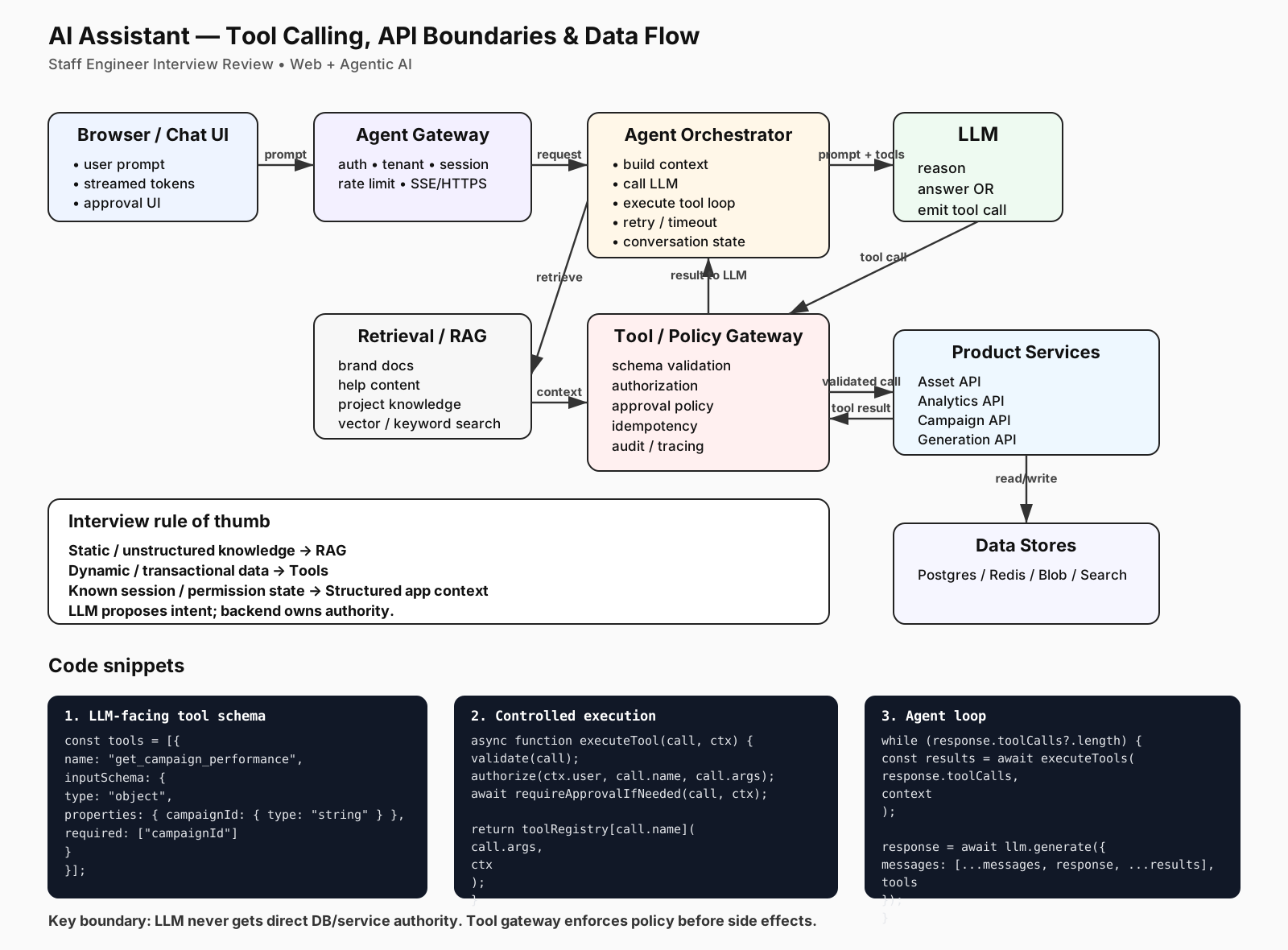
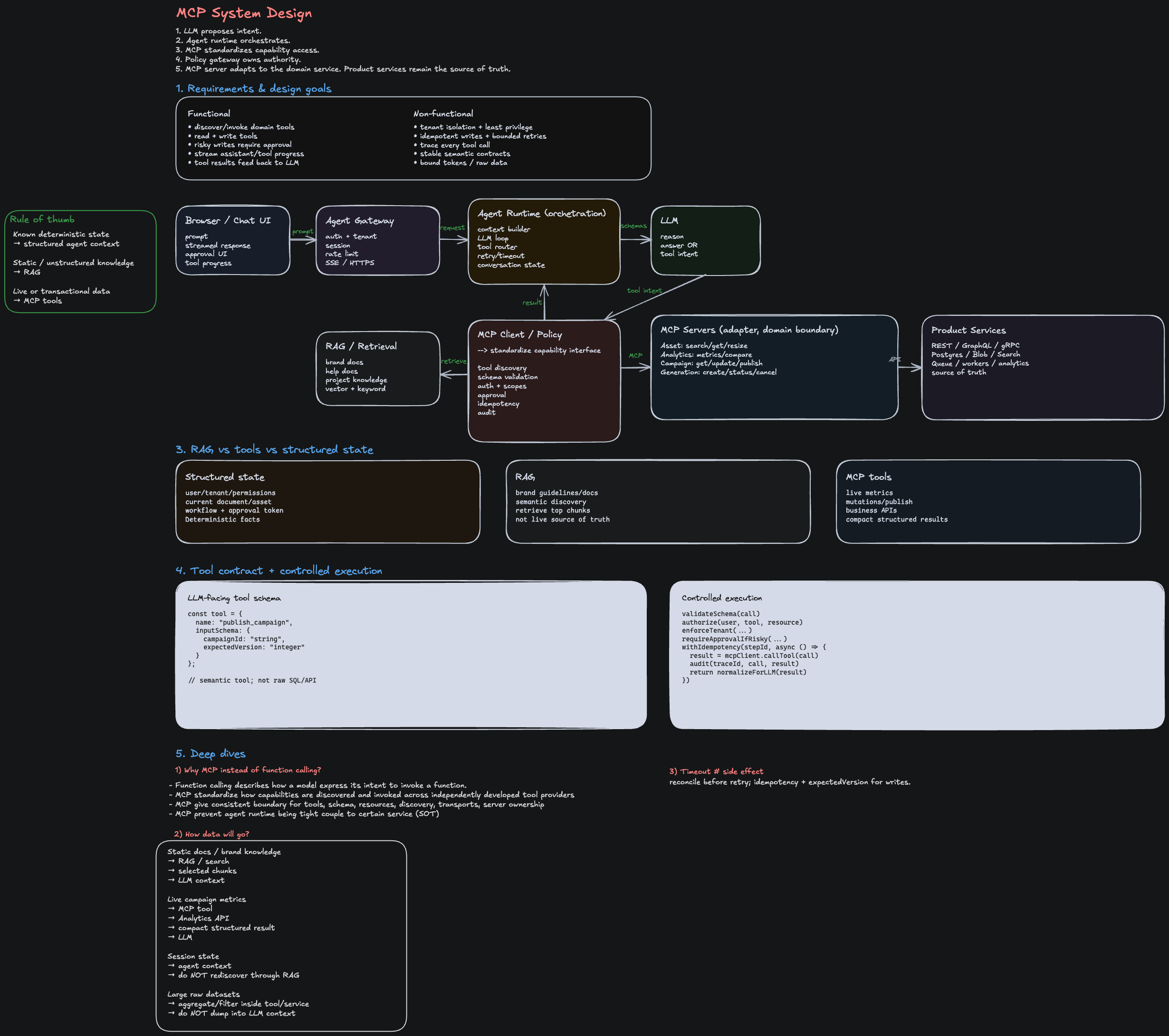
The core principle that earns staff-level signal: LLM proposes intent; backend owns authority. The architecture separates reasoning (LLM) from execution (services) via a strictly controlled tool-calling layer.
| Component | Responsibility | Key concern |
|---|---|---|
| Browser/Chat UI | Capture user prompt, stream tokens, show approval prompts | UX responsiveness, real-time feedback |
| Agent Gateway | Auth, tenant isolation, session, rate limit, SSE/HTTPS | Security, per-tenant fairness |
| Agent Orchestrator | Build context, call LLM, loop on tool calls, manage state | Retry logic, token budget, conversation history |
| LLM | Reason about intent, emit tool calls or final answer | Accuracy, instruction following |
| Tool/Policy Gateway | Validate schema, authorize, require approval if needed, idempotency | Safety, auditability, preventing unintended side effects |
| RAG (Retrieval) | Static/unstructured knowledge (brand docs, help content, project knowledge) | Freshness, relevance, context quality |
| Product Services | Asset API, Analytics API, Campaign API, Generation API | Availability, rate limiting, transactional correctness |
| Data Stores | Postgres/Redis/Blob/Search — source of truth | Consistency, read-your-write semantics |
The rule of thumb:
- Static/unstructured knowledge → RAG
- Dynamic/transactional data → Tools
- Known session/permission state → Structured app context (passed to orchestrator on every request)
- LLM proposes → backend validates and owns the final decision
The Five API Boundaries
This diagram shows five critical boundaries where security, consistency, and user trust happen. Failing at any one breaks the system.
1. Browser ↔ Agent Gateway (Auth & Tenant Isolation)
The problem: A user's prompt must not leak to another tenant, and the session must be validated before the agent even looks at the request.
What happens:
Browser
  └─ POST /api/agent/chat
       ├─ Authentication token (JWT, session cookie)
       ├─ User prompt
       ├─ Conversation history (if resuming)
       └─ Optional: overrides (model, temperature)

Agent Gateway
  ├─ Verify token → extract user_id, tenant_id, permissions
  ├─ Rate limit per tenant & user
  ├─ Establish SSE stream back to browser
  ├─ Pass context to Orchestrator:
  │   {
  │     user_id, tenant_id, permissions,
  │     session_id, request_id, timestamp
  │   }
  └─ Stream tokens + tool approval prompts to browser
Interview question: "How would you prevent a user from accessing another tenant's campaigns?"
Answer: Auth is validated at the gateway, and the tenant_id extracted from the token is threaded through every downstream call. A tool like get_campaign_performance(campaign_id) doesn't trust the campaign_id alone — it checks SELECT * FROM campaigns WHERE id = ? AND tenant_id = ?. The LLM never sees tenant_id as an input; it's injected by the backend.
2. Agent Orchestrator ↔ LLM (Prompt + Tool Schema)
The problem: The LLM must be given only the tools it's allowed to use, and the prompt must include context about the current session/permissions.
What happens:
Orchestrator builds request to LLM:
{
  system: "You are an AI assistant for marketing. You can only call tools defined below.",
  messages: [
    { role: "user", content: "What's the performance of my campaign?" },
    // Conversation history filled in here
  ],
  tools: [
    {
      name: "get_campaign_performance",
      description: "Fetch KPIs for a campaign",
      inputSchema: {
        type: "object",
        properties: {
          campaignId: { type: "string", description: "ID of the campaign" }
        },
        required: ["campaignId"]
      }
    },
    // Only tools the user can access are listed
  ],
  temperature: 0.7,
  max_tokens: 1024
}

LLM response:
{
  type: "tool_call",
  toolName: "get_campaign_performance",
  arguments: { campaignId: "camp_12345" },
  id: "call_abc123"
}
Interview question: "Why not just send all tools to the LLM and let it decide?"
Answer:
- Token cost — every tool in the schema adds tokens; only send what's relevant
- Security — if a user can't delete a campaign, don't tell the LLM the delete tool exists
- Predictability — fewer tools = fewer hallucinated tool calls
3. LLM ↔ Tool/Policy Gateway (Tool Call Validation & Approval)
The problem: The LLM emits JSON; we must validate it, check permissions, and optionally require human approval before execution.
What happens:
LLM emits: { toolName: "delete_campaign", arguments: { campaignId: "camp_12345" } }

Tool/Policy Gateway checks:
1. Schema validation — does the JSON match the tool's inputSchema?
   ✓ delete_campaign expects { campaignId: string }

2. Authorization — can this user do this action?
   SELECT * FROM campaigns WHERE id = ? AND tenant_id = ?
   if not found OR user lacks delete permission: DENY

3. Approval policy — do we need human sign-off?
   if action.severity == "high" and user.role != "admin": REQUIRE_APPROVAL
   → Send approval UI back to browser; wait for user to click "OK"

4. Idempotency — has this exact call succeeded before?
   if cached result exists for (user_id, call_id, args_hash): RETURN_CACHED
   → Prevents double-execution on retry

5. Audit log — record every tool attempt
   INSERT INTO audit_log (user_id, tool_name, args, result, timestamp)
Key code pattern:
async function executeTool(toolCall, context) {
  // 1. Validate
  const toolDef = toolRegistry[toolCall.name];
  if (!toolDef) throw new Error(`Unknown tool: ${toolCall.name}`);

  const valid = ajv.validate(toolDef.inputSchema, toolCall.arguments);
  if (!valid) throw new Error(`Invalid arguments: ${ajv.errorsText()}`);

  // 2. Authorize
  const canExecute = await checkPermission(context.userId, toolCall.name, toolCall.arguments);
  if (!canExecute) throw new Error('Unauthorized');

  // 3. Require approval if needed
  if (toolDef.requiresApproval && !context.approvalToken) {
    return {
      status: 'pending_approval',
      message: `This action requires approval. Check your browser.`,
      approvalId: generateApprovalId(),
    };
  }

  // 4. Check idempotency cache
  const cacheKey = `${context.userId}:${toolCall.id}:${hashArgs(toolCall.arguments)}`;
  const cached = await redis.get(cacheKey);
  if (cached) return JSON.parse(cached);

  // 5. Execute
  const result = await toolRegistry[toolCall.name](toolCall.arguments, context);

  // 6. Cache & audit
  await redis.set(cacheKey, JSON.stringify(result), 'EX', 3600);
  await auditLog.insert({
    user_id: context.userId,
    tool_name: toolCall.name,
    args: toolCall.arguments,
    result,
    timestamp: new Date(),
  });

  return result;
}
Interview question: "What happens if the LLM tries to call a tool it shouldn't have access to?"
Answer: The Policy Gateway checks authorization before execution. The LLM should never be in a position where it can call a tool it's not allowed to — that's a UI/schema problem. But if it somehow does (prompt injection, model jailbreak), the policy gateway is the firewall.
4. Agent Orchestrator ↔ RAG (Context Retrieval)
The problem: The LLM needs background knowledge (brand guidelines, company policies, existing feature descriptions) to ground its reasoning, but we don't want to bloat the prompt with irrelevant documents.
What happens:
Orchestrator:
1. Embed the user query: "Tell me about email campaign performance"
2. Vector search (or keyword search) in RAG store:
   SELECT * FROM documents
   WHERE tenant_id = ? AND vector_similarity(embedding, query_embedding) > 0.7
   LIMIT 5

3. Retrieve the top 5 docs (e.g., "Email Campaign Best Practices", "Performance Metrics Glossary", ...)

4. Build augmented prompt:
   system: "You are an AI assistant..."
   context: "Relevant company docs:\n\n{{retrieved_docs}}\n\n"
   user_message: "{{original_query}}"

5. Call LLM with augmented prompt
Key metric: Relevance. If the RAG retrieves irrelevant docs, the LLM wastes tokens and may hallucinate based on wrong context. Measure retrieval accuracy via:
- Click-through rate on suggested answers
- User corrections ("That's not what I meant")
- Ablation: does the LLM answer differently without RAG? (Usually worse.)
5. Orchestrator ↔ Product Services ↔ Data Stores (Transactional Correctness)
The problem: Tool results must reflect the current state of the system. If a tool reads stale data, the LLM makes wrong decisions.
What happens:
Tool call result from orchestrator:
{
  toolName: "get_campaign_performance",
  arguments: { campaignId: "camp_12345" },
  result: {
    campaignId: "camp_12345",
    impressions: 50000,
    clicks: 1200,
    ctr: 0.024,
    spend: 500.00,
    roi: 4.2,
    lastUpdated: "2026-08-07T10:15:00Z"
  }
}

Orchestrator adds result to conversation history:
messages: [
  { role: "user", content: "What's the performance of my campaign?" },
  { role: "assistant", content: "I'll fetch that for you." },
  { role: "tool", toolName: "get_campaign_performance", content: result }
]

LLM now has fresh data and reasons about it
Freshness contracts:
- Read-only tools (get performance, list campaigns) → up-to-date read replicas, eventual consistency acceptable
- Write tools (create campaign, update budget) → primary DB, transaction logs, idempotency keys
- Side effects (send email, trigger export) → queued reliably, retryable
The Agent Loop (Pseudocode)
async function agentLoop(userPrompt, context) {
  let messages = [
    { role: 'system', content: SYSTEM_PROMPT },
    { role: 'user', content: userPrompt },
  ];

  let iteration = 0;
  const maxIterations = 10; // Prevent infinite loops

  while (iteration < maxIterations) {
    iteration++;

    // 1. Call LLM
    const response = await callLLM({
      messages,
      tools: getAvailableTools(context.permissions),
      temperature: 0.7,
    });

    // 2. LLM outputs answer or tool calls
    if (response.type === 'text') {
      // Final answer — stream to user
      return { type: 'answer', content: response.content };
    }

    if (response.type === 'tool_calls') {
      const toolCalls = response.toolCalls; // Array of { toolName, arguments, id }

      // 3. Execute tools (in parallel when safe)
      const results = await Promise.all(toolCalls.map((call) => executeTool(call, context)));

      // 4. Check for pending approvals
      const pendingApprovals = results.filter((r) => r.status === 'pending_approval');
      if (pendingApprovals.length > 0) {
        // Stream approval UI to browser; wait for user response
        const approvals = await waitForApprovals(pendingApprovals, context);
        // Re-execute with approval tokens
        const approvedResults = await Promise.all(
          pendingApprovals.map((call, i) =>
            executeTool(call, { ...context, approvalToken: approvals[i] })
          )
        );
        results.splice(
          results.indexOf(pendingApprovals[0]),
          pendingApprovals.length,
          ...approvedResults
        );
      }

      // 5. Add tool results to conversation history
      messages.push(
        { role: 'assistant', content: '', toolCalls },
        { role: 'tool', content: results.map((r) => ({ ...r })) }
      );

      // 6. Loop — LLM reasons about results and decides next step
    }
  }

  // If we hit max iterations, stop and tell user
  return { type: 'error', content: 'Agent loop exceeded max iterations' };
}
Common Failure Modes & How to Prevent Them
| Failure mode | Why it happens | How to prevent it | Interview signal |
|---|---|---|---|
| LLM calls a tool outside its permission set | Tool schema isn't filtered by permission | Build the tool schema dynamically based on context.permissions; don't hardcode all tools | "Tool schema is built per-request, not globally" |
| Tool result is stale | Reading from cache or replica with too much lag | Use primary DB for transactional tools; read replicas only for analytics | "I understand read-your-write semantics and when consistency matters" |
| Same tool call executed twice | Network retry, browser reload, agent loop bug | Idempotency key = (user_id, tool_id, hash(args)); cache result | "Idempotency is mandatory for mutation tools" |
| LLM hallucinates tool names | Too much freedom in the prompt | Strictly validate toolName against schema; reject unknown tools hard | "I validate before executing, not after" |
| User prompt leaks another tenant's data | Tenant context not threaded to all queries | Extract tenant_id from token at gateway; pass on every API call; validate in every query | "Tenant isolation is a vertical concern, not horizontal" |
| Approval UI confuses the user | Approval prompt is too technical or arrives too late | Show what the tool will do in plain language; show results inline after execution | "I design approval flows for real users, not just LLMs" |
| Agent loops forever | No iteration limit or cycle detection | Max iterations counter + cycle detection (if same tool call repeated N times, ask user for clarification) | "I'm paranoid about infinite loops in production" |
Interview Follow-ups
-
"How do you decide if a tool requires approval?" — Model it as a policy: high-risk actions (delete, charge money, send comms) require approval; read-only tools don't. Approval level depends on user role and organization policy.
-
"What happens if the LLM tries to call a tool with invalid arguments?" — The Policy Gateway schema-validates before execution. If invalid, return an error to the LLM (add to messages as a "tool error") so it can correct and retry.
-
"How do you handle rate limiting at scale?" — Per-user and per-tenant token buckets. The Agent Gateway checks before passing to Orchestrator. If over limit, fail fast with a "rate limit exceeded" message to user.
-
"How would you detect prompt injection?" — Hard to do with traditional filtering. Better approaches: (1) Monitor unusual tool call patterns via audit logs, (2) Use a jailbreak-resistant model, (3) Limit tool capabilities to what's genuinely needed, (4) Detect if LLM is trying to call tools that don't exist or with repeated invalid args.
-
"How do you version tools without breaking existing agents?" — Tool schema includes a
versionfield. The orchestrator can maintain multiple versions of the same tool side-by-side. LLM is told which version to use via the schema. When deprecating, gradually migrate users. -
"What does a good audit log entry include?" — user_id, tenant_id, tool_name, tool_version, arguments (sanitized), result (sanitized), timestamp, request_id (for linking with user session), status (success/failure), error (if failed). Queryable by user, time, tenant, and tool for compliance.