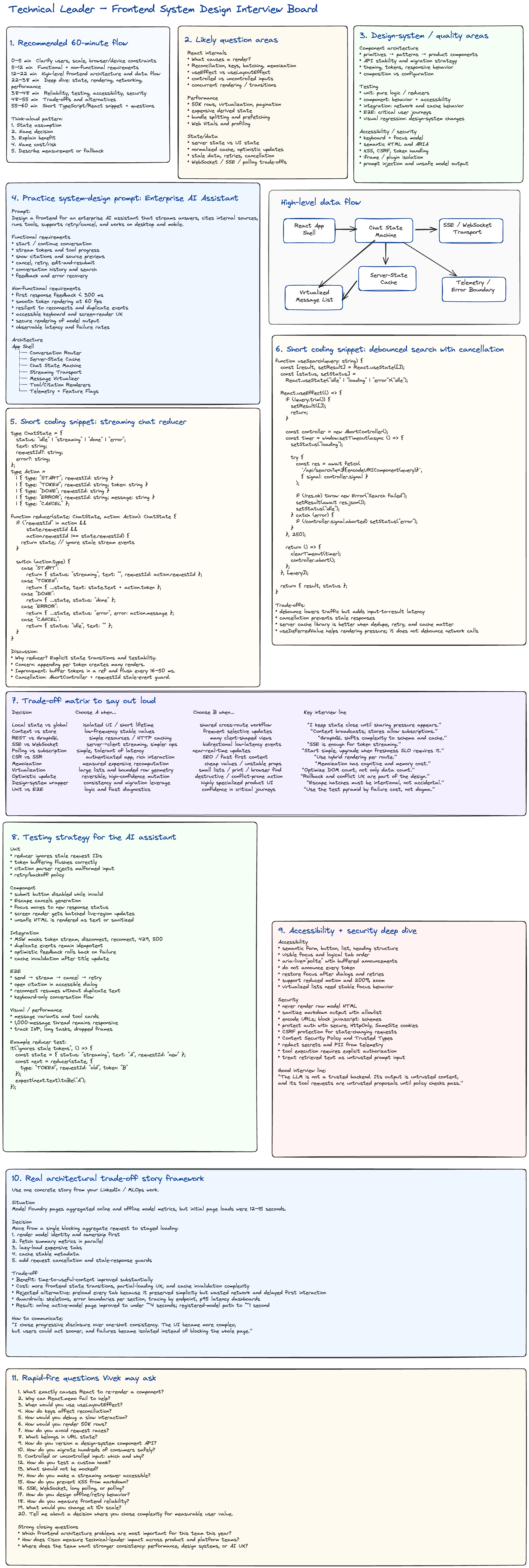
Frontend System Design Interview Guide
Use this guide to practice answering in a staff engineer / technical leader style.
A strong answer usually follows this structure:
- Clarify the context.
- State the default approach.
- Explain why it works.
- Name the trade-offs.
- Describe how you would measure success.
- Explain what changes at larger scale.
1. What exactly causes React to re-render a component?
A React component re-renders when React schedules work for it because of one of these triggers:
- Its local state changes.
- Its parent re-renders.
- A consumed context value changes.
- An external store subscription reports a change.
- Its key changes, causing React to treat it as a new component.
A re-render means React calls the component function again. It does not necessarily mean the DOM changes.
function Counter() {
  const [count, setCount] = React.useState(0);

  return <button onClick={() => setCount(count + 1)}>{count}</button>;
}
Calling setCount schedules a render. React then compares the new element tree with the previous one and only commits necessary DOM changes.
Important nuance
This can re-render Child even when Child's visible output has not changed:
function Parent() {
  const [count, setCount] = React.useState(0);

  return (
    <>
      <button onClick={() => setCount(count + 1)}>Increment</button>

      <Child />
    </>
  );
}

function Child() {
  console.log('Child rendered');
  return <div>Static content</div>;
}
Staff-level answer
I distinguish between:
- render frequency,
- render cost,
- commit cost,
- and user-perceived latency.
I do not optimize re-renders in isolation. I use React Profiler and browser performance tools to find expensive renders, layout work, or long tasks.
Trade-off
Preventing every unnecessary render often adds memoization complexity. I optimize only when measurements show meaningful user impact.
2. Why can React.memo fail to help?
React.memo performs a shallow comparison of props. It may not help when:
- props are newly allocated on every render,
- the child consumes changing context,
- the child has its own state updates,
- the render is already cheap,
- the comparison costs more than re-rendering,
- or the parent passes unstable callbacks or objects.
const UserCard = React.memo(function UserCard({
  user,
  onSelect,
}: {
  user: { id: string; name: string };
  onSelect: () => void;
}) {
  return <button onClick={onSelect}>{user.name}</button>;
});
This defeats memoization:
<UserCard user={{ id: '1', name: 'Khanh' }} onSelect={() => selectUser('1')} />
Both props receive new identities every render.
A more stable version:
function Parent() {
  const user = React.useMemo(() => ({ id: '1', name: 'Khanh' }), []);

  const handleSelect = React.useCallback(() => {
    selectUser('1');
  }, []);

  return <UserCard user={user} onSelect={handleSelect} />;
}
Staff-level answer
I treat React.memo as a targeted optimization, not a default coding rule. Before adding it, I ask:
- Is this component expensive?
- Does it re-render frequently?
- Are its props stable?
- Does profiling show improvement?
- Does memoization make the API harder to use?
Trade-off
Memoization consumes memory, adds comparison work, and increases cognitive overhead. It can also hide poor state ownership.
3. When would you use useLayoutEffect?
Use useLayoutEffect when you must read layout or synchronously update the DOM before the browser paints.
Typical use cases:
- measuring element dimensions,
- positioning a tooltip or popover,
- restoring scroll position,
- preventing visible layout jumps,
- synchronizing with an imperative UI library.
function Tooltip({ anchorRef }: { anchorRef: React.RefObject<HTMLElement> }) {
  const tooltipRef = React.useRef<HTMLDivElement>(null);

  React.useLayoutEffect(() => {
    const anchor = anchorRef.current;
    const tooltip = tooltipRef.current;

    if (!anchor || !tooltip) return;

    const rect = anchor.getBoundingClientRect();

    tooltip.style.top = `${rect.bottom + 8}px`;
    tooltip.style.left = `${rect.left}px`;
  }, [anchorRef]);

  return <div ref={tooltipRef}>Tooltip</div>;
}
Why not always use it?
useLayoutEffect blocks painting. Heavy work inside it can delay visual updates.
Prefer useEffect for:
- network requests,
- logging,
- analytics,
- subscriptions,
- non-visual synchronization.
Staff-level answer
My default is useEffect. I choose useLayoutEffect only when the user could otherwise see an incorrect intermediate layout.
Trade-off
It improves visual correctness but can hurt responsiveness because it runs synchronously before paint.
4. How do keys affect reconciliation?
Keys help React identify which list items correspond between renders.
Good keys are:
- stable,
- unique among siblings,
- tied to item identity,
- independent of list position.
users.map((user) => <UserRow key={user.id} user={user} />);
Using indexes is risky when items can be inserted, removed, sorted, or filtered:
users.map((user, index) => <UserRow key={index} user={user} />);
This can cause:
- incorrect component state reuse,
- focus moving unexpectedly,
- animations attaching to the wrong item,
- input values appearing in the wrong row.
Changing a key intentionally forces remounting:
<Editor key={documentId} documentId={documentId} />
This resets the component's local state when documentId changes.
Staff-level answer
Keys are not only a performance hint. They define component identity.
Trade-off
Using a new key can be a clean reset mechanism, but it also discards local state, focus, subscriptions, and cached work.
5. How would you debug a slow interaction?
I start with a measurable user action, such as:
- typing in search,
- opening a modal,
- switching tabs,
- scrolling a list,
- submitting a form.
Then I break the latency into layers.
Step 1: Reproduce consistently
Record:
- device class,
- browser,
- network condition,
- dataset size,
- feature flags,
- production versus development behavior.
Step 2: Use browser performance tools
Look for:
- long JavaScript tasks,
- forced synchronous layout,
- style recalculation,
- excessive painting,
- large DOM trees,
- expensive event handlers.
Step 3: Use React Profiler
Look for:
- which components rendered,
- why they rendered,
- render duration,
- repeated commits,
- expensive context propagation.
Step 4: Inspect network behavior
Check:
- waterfalls,
- duplicate requests,
- blocking requests,
- oversized payloads,
- retry storms,
- cache misses.
Step 5: Add product instrumentation
Measure:
performance.mark('search-start');

// perform interaction

performance.mark('search-end');

performance.measure('search-latency', 'search-start', 'search-end');
Useful metrics:
- Interaction to Next Paint,
- input-to-result latency,
- p50 and p95 response time,
- dropped frames,
- long task count,
- error rate.
Staff-level answer
I avoid jumping directly to memoization. I first identify whether the bottleneck is rendering, JavaScript, network, layout, or backend latency.
Trade-off
A local optimization may improve one interaction while increasing code complexity or shifting cost elsewhere. I validate with before-and-after measurements.
6. How would you render 50K rows?
I would not render 50,000 DOM nodes at once.
My default approach:
- window or virtualize visible rows,
- fetch or process data incrementally,
- keep row rendering cheap,
- avoid global state updates per row,
- support keyboard and screen-reader navigation carefully.
import { FixedSizeList } from 'react-window';

type Row = {
  id: string;
  name: string;
};

function LargeList({ rows }: { rows: Row[] }) {
  return (
    <FixedSizeList height={600} width="100%" itemCount={rows.length} itemSize={40} itemData={rows}>
      {({ index, style, data }) => {
        const row = data[index];

        return (
          <div style={style} role="row">
            {row.name}
          </div>
        );
      }}
    </FixedSizeList>
  );
}
Additional considerations
For variable row heights:
- estimate heights,
- cache measurements,
- use a variable-size virtualizer,
- avoid frequent layout reads.
For sorting and filtering:
- use memoized selectors,
- move expensive computation to a Web Worker if needed,
- consider server-side filtering for very large datasets.
For accessibility:
- preserve logical row indices,
- expose total row count,
- ensure focus does not disappear unexpectedly,
- provide non-virtualized alternatives for print/export.
Staff-level answer
The main goal is to bound:
- DOM node count,
- work per scroll frame,
- memory,
- and network payload size.
Trade-off
Virtualization improves performance but complicates:
- browser find,
- printing,
- screen-reader behavior,
- dynamic height calculation,
- and focus management.
7. How do you avoid request races?
Request races happen when an older request resolves after a newer one and overwrites fresh state.
Use:
AbortController,- request IDs,
- stale-response checks,
- cache libraries with deduplication,
- idempotent APIs.
function useUserSearch(query: string) {
  const [users, setUsers] = React.useState([]);

  React.useEffect(() => {
    if (!query) {
      setUsers([]);
      return;
    }

    const controller = new AbortController();

    async function run() {
      const response = await fetch(`/api/users?q=${encodeURIComponent(query)}`, {
        signal: controller.signal,
      });

      if (!response.ok) {
        throw new Error('Search failed');
      }

      const data = await response.json();
      setUsers(data);
    }

    run().catch((error) => {
      if (error.name !== 'AbortError') {
        console.error(error);
      }
    });

    return () => controller.abort();
  }, [query]);

  return users;
}
Request ID guard:
let latestRequestId = 0;

async function search(query: string) {
  const requestId = ++latestRequestId;
  const result = await fetchSearch(query);

  if (requestId !== latestRequestId) {
    return;
  }

  renderResult(result);
}
Staff-level answer
Cancellation is useful, but I do not rely on it alone. The server may already have processed the request, so state updates should still be guarded against stale results.
Trade-off
More race protection adds state-machine complexity. Libraries such as TanStack Query can centralize cancellation, deduplication, retries, and cache policy.
8. What belongs in URL state?
Use URL state for information users should be able to:
- bookmark,
- share,
- refresh,
- navigate with back and forward,
- open in a new tab.
Good candidates:
- search query,
- filters,
- selected tab,
- sort order,
- pagination cursor or page,
- resource ID,
- modal route when deep-linking matters.
const params = new URLSearchParams(window.location.search);

const query = params.get('q') ?? '';
const sort = params.get('sort') ?? 'recent';
Do not usually store:
- hover state,
- temporary form drafts,
- open tooltip state,
- animation state,
- sensitive tokens,
- large serialized objects.
Staff-level answer
The URL is a public, durable navigation contract. I keep it compact, stable, and backward-compatible.
Trade-off
Putting too much state in the URL creates synchronization complexity. Putting too little breaks navigation, sharing, and restoration.
9. How do you version a design-system component API?
My default goal is to avoid frequent major-version changes.
I use:
- semantic versioning,
- deprecation warnings,
- codemods,
- compatibility layers,
- migration guides,
- usage telemetry,
- visual regression tests,
- staged rollout.
Example API evolution:
// Old
<Button type="primary" />

// New
<Button variant="primary" />
Compatibility layer:
type ButtonProps = {
  variant?: 'primary' | 'secondary';
  type?: 'primary' | 'secondary';
};

function Button({ variant, type, ...props }: ButtonProps) {
  const resolvedVariant = variant ?? type ?? 'secondary';

  if (process.env.NODE_ENV !== 'production' && type) {
    console.warn('`type` is deprecated. Use `variant` instead.');
  }

  return <button data-variant={resolvedVariant} {...props} />;
}
Versioning strategy
- Add the new API.
- Keep the old API temporarily.
- Emit development warnings.
- Publish migration documentation.
- provide a codemod.
- Track remaining usage.
- remove the old API in a planned major release.
Staff-level answer
A design-system API is an organizational contract, not only a package interface. Migration cost must be part of the API design.
Trade-off
Compatibility layers reduce migration risk but increase maintenance burden and can keep poor APIs alive too long.
10. How do you migrate hundreds of consumers safely?
I use a staged migration.
Phase 1: Inventory
Measure:
- number of consumers,
- versions in use,
- common API patterns,
- unsupported usage,
- high-risk products,
- teams and owners.
Phase 2: Build compatibility
Create:
- adapter layer,
- warnings,
- codemod,
- documentation,
- before-and-after examples.
Phase 3: Automated migration
Use AST-based codemods instead of regex for structural changes.
// Conceptual transform:
// <Button type="primary" />
// becomes
// <Button variant="primary" />
Phase 4: Validate
Run:
- TypeScript compilation,
- unit tests,
- visual regression tests,
- accessibility checks,
- critical E2E tests.
Phase 5: Roll out gradually
Use:
- canary releases,
- feature flags,
- selected early adopters,
- version adoption dashboards,
- rollback plans.
Staff-level answer
I separate mechanical migration from semantic migration. Mechanical changes can be automated. Behavioral changes require owner review.
Trade-off
A big-bang migration is faster on paper but risky operationally. A staged migration is safer but temporarily increases compatibility code and support cost.
11. Controlled or uncontrolled input: which and why?
Controlled input
React state is the source of truth.
function ControlledInput() {
  const [value, setValue] = React.useState('');

  return <input value={value} onChange={(event) => setValue(event.target.value)} />;
}
Use controlled inputs when you need:
- immediate validation,
- derived UI,
- formatting,
- dependent fields,
- centralized form state,
- conditional behavior.
Uncontrolled input
The DOM stores the value.
function UncontrolledInput() {
  const inputRef = React.useRef<HTMLInputElement>(null);

  function submit() {
    console.log(inputRef.current?.value);
  }

  return (
    <>
      <input ref={inputRef} defaultValue="" />
      <button onClick={submit}>Submit</button>
    </>
  );
}
Use uncontrolled inputs when:
- values are needed mostly at submit time,
- performance matters for large forms,
- integrating with native browser behavior,
- integrating with non-React libraries.
Staff-level answer
I choose based on interaction requirements, not ideology. A hybrid model is common: uncontrolled field storage with controlled validation and form state.
Trade-off
Controlled inputs provide predictable state but may cause frequent renders. Uncontrolled inputs are cheaper but make cross-field coordination and immediate validation harder.
12. How do you test a custom hook?
Test behavior through a component when possible. Use renderHook for focused hook APIs.
Example hook:
function useToggle(initial = false) {
  const [value, setValue] = React.useState(initial);

  const toggle = React.useCallback(() => {
    setValue((current) => !current);
  }, []);

  return { value, toggle };
}
Test:
import { act, renderHook } from '@testing-library/react';

it('toggles the value', () => {
  const { result } = renderHook(() => useToggle());

  expect(result.current.value).toBe(false);

  act(() => {
    result.current.toggle();
  });

  expect(result.current.value).toBe(true);
});
For hooks with network behavior:
- mock at the HTTP boundary,
- test loading, success, empty, error, retry, and cancellation,
- avoid asserting internal implementation details.
Staff-level answer
I test observable behavior and lifecycle semantics:
- initial state,
- transitions,
- cleanup,
- stale updates,
- dependency changes,
- error recovery.
Trade-off
Direct hook tests are fast and focused, but component-level tests often provide stronger confidence that the hook works correctly in real usage.
13. What should not be mocked?
Do not mock the subject of the test.
Avoid mocking:
- pure business logic being tested,
- React itself,
- simple data transformations,
- browser behavior that the test depends on,
- every child component,
- every internal module.
Prefer mocking at system boundaries:
- network,
- time,
- storage,
- analytics,
- external SDKs,
- nondeterministic services.
For network tests, prefer Mock Service Worker:
server.use(
  http.get('/api/users', () => {
    return HttpResponse.json([{ id: '1', name: 'Khanh' }]);
  })
);
Staff-level answer
Over-mocking creates tests that verify your mocks rather than the product.
Trade-off
Mocks increase speed and determinism, but too many mocks reduce realism and make refactoring expensive.
14. How do you make a streaming answer accessible?
Do not announce every token to a screen reader.
Instead:
- buffer text,
- announce meaningful chunks,
- use
aria-live="polite", - expose a clear generating status,
- provide stop and retry controls,
- preserve focus,
- allow reduced motion,
- ensure keyboard access.
function StreamingAnswer({
  visibleText,
  announcedText,
  isStreaming,
}: {
  visibleText: string;
  announcedText: string;
  isStreaming: boolean;
}) {
  return (
    <section aria-labelledby="answer-heading">
      <h2 id="answer-heading">Assistant response</h2>

      <div aria-hidden="true">{visibleText}</div>

      <div className="sr-only" aria-live="polite" aria-atomic="true">
        {announcedText}
      </div>

      {isStreaming && <p role="status">Generating response</p>}
    </section>
  );
}
Important details
- Batch announcements every sentence or several hundred milliseconds.
- Do not move focus on every update.
- Put focus on errors only when necessary.
- Make stop generation reachable by keyboard.
- Communicate tool execution and retries.
Staff-level answer
The visual stream and assistive-technology stream do not need identical update frequency.
Trade-off
More frequent announcements feel current but overwhelm screen-reader users. More batching improves usability but slightly delays spoken updates.
15. How do you prevent XSS from markdown?
Treat model-generated and user-generated markdown as untrusted input.
Use:
- a markdown parser that does not allow raw HTML by default,
- an HTML sanitizer with an allowlist,
- URL scheme validation,
- Content Security Policy,
- Trusted Types where supported,
- secure link attributes.
Example:
import ReactMarkdown from 'react-markdown';
import rehypeSanitize from 'rehype-sanitize';

function SafeMarkdown({ content }: { content: string }) {
  return (
    <ReactMarkdown
      rehypePlugins={[rehypeSanitize]}
      components={{
        a({ href, children }) {
          const safeHref =
            href && (href.startsWith('https://') || href.startsWith('http://')) ? href : undefined;

          return (
            <a href={safeHref} target="_blank" rel="noopener noreferrer">
              {children}
            </a>
          );
        },
      }}
    >
      {content}
    </ReactMarkdown>
  );
}
Avoid:
<div dangerouslySetInnerHTML={{ __html: modelOutput }} />
Staff-level answer
The LLM is not a trusted renderer. Its output is untrusted content, even when it came from an internal model.
Trade-off
A strict allowlist may remove useful formatting. A permissive policy improves flexibility but increases security risk.
16. SSE, WebSocket, long polling, or polling?
Comparison
| Transport | Best for | Strengths | Weaknesses |
|---|---|---|---|
| SSE | Server-to-client streaming | Simple, HTTP-based, auto-reconnect | One-way, connection limits |
| WebSocket | Bidirectional real-time communication | Low-latency, full duplex | More operational complexity |
| Long polling | Compatibility when streaming is unavailable | Works over standard HTTP | Repeated request overhead |
| Polling | Low-frequency freshness | Simple and predictable | Wasteful, stale between polls |
SSE example
const source = new EventSource('/api/stream');

source.onmessage = (event) => {
  const data = JSON.parse(event.data);
  console.log(data);
};

source.onerror = () => {
  source.close();
};
Decision guidance
Use SSE when:
- the server mainly pushes tokens or events,
- reconnect support is useful,
- client-to-server traffic can use normal HTTP requests.
Use WebSocket when:
- both sides send frequent events,
- presence, collaboration, or live control is required,
- low-latency bidirectional messaging matters.
Use polling when:
- freshness requirements are relaxed,
- infrastructure simplicity matters,
- updates are infrequent.
Staff-level answer
For an AI chat stream, SSE is often sufficient because prompts use HTTP and token output flows server-to-client.
Trade-off
WebSocket is more flexible, but flexibility is not free. It increases connection management, auth renewal, backpressure, observability, and operational complexity.
17. How do you design offline and retry behavior?
Start by classifying operations.
Safe to retry
- reads,
- idempotent writes,
- requests with idempotency keys.
Risky to retry
- destructive operations,
- non-idempotent payments,
- tool executions with external side effects.
Example retry helper:
async function retry<T>(operation: () => Promise<T>, maxAttempts = 3): Promise<T> {
  let lastError: unknown;

  for (let attempt = 1; attempt <= maxAttempts; attempt++) {
    try {
      return await operation();
    } catch (error) {
      lastError = error;

      if (attempt === maxAttempts) {
        break;
      }

      const delay = Math.min(1000 * 2 ** (attempt - 1), 8000) + Math.random() * 250;

      await new Promise((resolve) => setTimeout(resolve, delay));
    }
  }

  throw lastError;
}
Offline architecture
- detect connectivity, but do not trust
navigator.onLinealone, - persist queued operations in IndexedDB,
- mark local changes as pending,
- retry when connectivity returns,
- preserve operation ordering,
- use idempotency keys,
- surface conflicts clearly.
User experience
Show:
- offline status,
- pending changes,
- failed changes,
- manual retry,
- conflict resolution.
Staff-level answer
Offline behavior is a product contract, not merely a network retry loop.
Trade-off
Automatic retries improve resilience but can create duplicate side effects or retry storms. Use backoff, jitter, retry budgets, and idempotency.
18. How do you measure frontend reliability?
I measure reliability from the user's perspective.
Core metrics
- page-load success rate,
- route transition success,
- JavaScript error rate,
- API failure rate,
- interaction latency,
- blank-screen rate,
- crash-free sessions,
- retry recovery rate,
- stale-data rate,
- streaming disconnect rate.
Performance metrics
- Largest Contentful Paint,
- Interaction to Next Paint,
- Cumulative Layout Shift,
- long tasks,
- dropped frames,
- memory growth.
Example instrumentation
window.addEventListener('error', (event) => {
  reportError({
    type: 'window-error',
    message: event.message,
    stack: event.error?.stack,
  });
});

window.addEventListener('unhandledrejection', (event) => {
  reportError({
    type: 'unhandled-rejection',
    reason: String(event.reason),
  });
});
Reliability segmentation
Break down metrics by:
- route,
- browser,
- device,
- geography,
- release,
- feature flag,
- customer tier,
- network type.
Staff-level answer
An aggregate error rate can hide a severe regression affecting one browser or one high-value workflow.
Trade-off
More telemetry improves diagnosis but increases cost, privacy risk, and noise. I define event schemas, sampling, retention, and PII redaction.
19. What would you change at 10× scale?
I first clarify which dimension grows:
- users,
- data,
- event rate,
- team count,
- repository size,
- geographic distribution,
- feature complexity.
Different bottlenecks need different solutions.
Frontend runtime
At 10× data:
- virtualization,
- incremental loading,
- worker-based computation,
- normalized state,
- pagination,
- server-side aggregation.
At 10× traffic:
- CDN caching,
- edge delivery,
- request deduplication,
- cache policy,
- rate limiting,
- graceful degradation.
At 10× team size:
- stronger design-system contracts,
- ownership boundaries,
- platform APIs,
- lint rules,
- architecture decision records,
- release governance,
- automated migrations.
At 10× feature count:
- modular architecture,
- route-level boundaries,
- feature flags,
- observability by domain,
- consistent error handling.
Staff-level answer
I do not redesign for 10× abstractly. I identify the first limit likely to fail and preserve simpler architecture elsewhere.
Trade-off
Premature scaling increases complexity. Delayed scaling creates operational risk. The decision should be driven by observed growth, projections, and migration cost.
20. Tell me about a decision where you chose complexity for measurable user value
Use this answer structure:
- situation,
- problem,
- options,
- decision,
- added complexity,
- mitigation,
- measurable result,
- lesson.
Example: Progressive loading for Model Foundry
Situation
A Model Foundry page aggregated model metadata, ownership, online metrics, offline metrics, and feature health.
The initial implementation waited for one large aggregate response before rendering the page.
Problem
The page took roughly 12–15 seconds for some active models. Users could not begin working until all data arrived.
Options considered
- Keep the single blocking request.
- Cache the entire aggregate response.
- Split the page into independently loaded sections.
- Preload every tab in parallel.
Decision
I chose progressive section loading:
- render identity and ownership first,
- fetch summary metrics in parallel,
- lazy-load expensive tabs,
- cache stable metadata,
- add cancellation and stale-response guards,
- isolate failures with section-level error boundaries.
Complexity introduced
- more loading states,
- partial data rendering,
- cache invalidation,
- request orchestration,
- section-specific error handling,
- more detailed telemetry.
Why the complexity was justified
The complexity was directly connected to user-perceived performance.
Users could view model ownership and begin navigation before every metric completed.
Risk mitigation
- consistent skeleton patterns,
- explicit partial-error states,
- request IDs,
- endpoint tracing,
- p95 latency dashboards,
- feature-flagged rollout.
Result
The active-model path improved from approximately 12–15 seconds to under 4 seconds, and another registered-model path improved to around 1 second.
Closing line
I chose progressive disclosure over one-shot consistency. The frontend became more complex, but users could act sooner, failures were isolated, and the improvement was measurable.
Additional Staff-Level Follow-Up Questions
React architecture
- How would you decide where state should live?
- How do React context updates propagate?
- When would you use an external store?
- How would you prevent tearing?
- When would you use
startTransition? - What is the difference between memoizing a value and deferring a value?
- How do Suspense boundaries affect user experience?
Performance
- How do you identify unnecessary layout thrashing?
- When should computation move to a Web Worker?
- How would you optimize a dashboard with many charts?
- How would you handle a slow third-party component?
- How do you set and enforce a performance budget?
Design systems
- What belongs in a primitive versus a product component?
- How do you allow customization without creating an unmaintainable API?
- How do you support theming and multiple brands?
- How do you handle accessibility regressions across hundreds of applications?
- How do you measure adoption and component health?
Testing
- What belongs in unit versus integration versus E2E testing?
- How do you test streaming behavior?
- How do you test race conditions?
- How do you reduce flaky E2E tests?
- What should block a release?
Accessibility
- How do you design keyboard navigation for a grid?
- When should you use
aria-activedescendant? - How do you manage focus in dialogs?
- How do virtualization and accessibility conflict?
- How would you test at 200% zoom?
Security
- How do you protect authentication tokens?
- How do you sandbox third-party plugins?
- How do you protect against CSRF?
- How do you prevent unsafe redirects?
- How do you secure an AI tool-execution workflow?
Strong Closing Questions
About the role
- What are the highest-impact frontend architecture problems this role is expected to solve in the first six months?
- How do you distinguish success for a technical leader from success for a senior individual contributor?
- Which decisions would I own directly, and which would require cross-organization alignment?
- What does strong technical leadership look like on this team during a difficult architectural disagreement?
About architecture
- Where does the current frontend architecture create the most developer friction?
- Which areas need the most investment: performance, reliability, design systems, accessibility, or platform consistency?
- Are teams moving toward a shared frontend platform, or do product groups retain significant architectural autonomy?
- How are major frontend architecture decisions documented and reviewed?
- What is the largest frontend migration the organization expects to undertake soon?
- How does the team balance platform standardization with product-team flexibility?
About scale and quality
- Which frontend reliability metrics matter most to the organization?
- How are performance budgets defined and enforced?
- What are the most common production issues affecting users today?
- How mature are the accessibility review and testing processes?
- How does the team manage design-system adoption across legacy and modern applications?
About AI and LLM interfaces
- How is Cisco thinking about AI-assisted workflows in its product interfaces?
- What are the biggest frontend challenges in current AI experiences: latency, trust, citations, streaming, tool execution, or observability?
- How are model failures and uncertain responses communicated to users?
- Are frontend teams involved in defining safety and authorization boundaries for AI tool execution?
- How does the organization evaluate whether an AI interaction is genuinely improving user productivity?
Strong final question
Based on our conversation, is there an area of my experience or technical approach that you would like me to clarify further?
This gives the interviewer an opportunity to raise concerns while there is still time to address them.
Final Interview Reminder
For each answer:
- start with the user or product requirement,
- state your default,
- explain the trade-off,
- mention failure modes,
- describe testing and observability,
- explain what changes at scale,
- stop after the main point and invite deeper discussion.
A technical leader should sound decisive without pretending there is only one correct solution.